View the complete source code and Supabase schema on GitHub
Less typing, editable records
I built Pocket CFO to keep personal spending records without repeatedly typing out receipts. I send a receipt, payment screenshot, or text to Telegram; Gemini extracts transaction fields, Supabase stores them, and a React dashboard lets me review the records.
The useful result is a workflow I use for my own finances. Extracted amounts and categories can be wrong, so review and correction remain part of that workflow.
Fig 0. A recorded example of receipt submission and dashboard results, not a latency or accuracy benchmark.
The source and recorded examples show the implementation. Hosting and API usage rely on free tiers with quotas and availability constraints.
Implementation review — September 12, 2026: Corrected earlier reliability and accuracy claims. This article update does not change the separately deployed application.
Why item-level data mattered
I wanted direct SQL access, control over the data model, and item-level records. An earlier manual-entry app became a chore after about a month. Telegram was already part of my routine, making it a practical place to submit receipts.
The Breaking Point: Item-Level Analytics
As someone who manages weekly grocery shopping for meal prepping, categorizing an entire receipt simply as "Groceries" wasn't enough. I wanted item-level granularity. I wanted to know the exact price per kilogram of chicken breast at Supermarket A versus Supermarket B. I wanted to track the historical price of avocados over a six-month period to monitor local micro-inflation.
I also wanted a "Safe to Spend" view. This is a budgeting estimate based on recorded transactions and configured budgets, not a guarantee of affordability; missing or incorrect records affect the result.
These were design goals: item-level records and less repetitive input. Automation does not remove the need to review or correct the data.
Separating input, extraction, and review
I separated bot ingestion from the dashboard so each could serve a different interaction pattern.
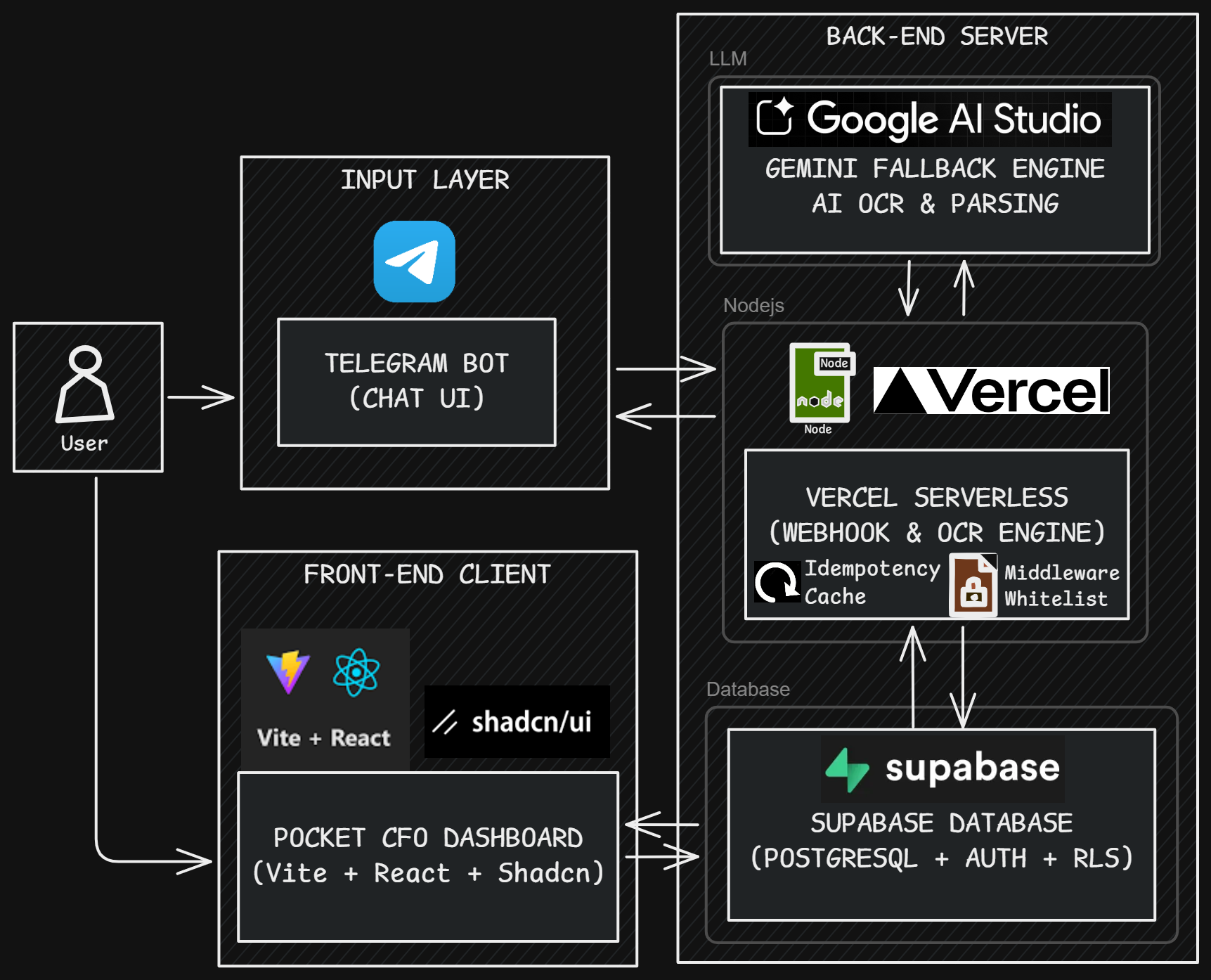
Fig 1. The Decoupled Pipeline: From Telegram webhooks to Supabase RLS and React rendering.
- Input (Telegram Bot): A familiar place for me to submit receipts and text.
- Compute (Node.js on Vercel Serverless): Handles webhooks without an always-running bot process. Timeouts and retries still need application-level handling.
- Extraction (Google Gemini): Produces structured transaction candidates. JSON syntax is not proof that a value is correct.
- Storage (Supabase/PostgreSQL): Stores profiles, transactions, items, and budgets, with authentication and RLS for dashboard access.
- Dashboard (Vite + React + Tailwind): The linked Pocket CFO frontend uses Vite, not the Next.js framework used by this portfolio.
Handling webhook retries
The hosting choice was influenced by a practical setup constraint.
I initially planned to run a stateful Telegraf process on Render, but could not complete card verification during setup. This describes my experience then, not Render's current requirements for every account.
I switched to Vercel Serverless Functions within the available free-tier allowance.
Telegram retries unsuccessful webhook deliveries, so processing the same update more than once is a concern. Its documentation does not specify the universal five-second, infinite-retry rule previously stated here. See Telegram's setWebhook documentation.
The implementation keeps a small in-memory set of update IDs. This is best-effort duplicate suppression within one warm process, not durable idempotency or an Edge runtime guarantee. The abbreviated excerpt below omits webhook authentication and error handling; it is not a production-ready handler.
// Abbreviated existing approach: process-local duplicate suppression
const processedUpdates = new Set();

module.exports = async (req, res) => {
  const updateId = req.body.update_id;

  // Intercept Telegram retries using global state during warm boots
  if (updateId) {
    if (processedUpdates.has(updateId)) {
      console.log(`[Idempotency] Dropped duplicate ID: ${updateId}`);
      return res.status(200).send('OK');
    }
    processedUpdates.add(updateId);

    // Memory Management: Prevent Set from bloating RAM
    if (processedUpdates.size > 100) {
      processedUpdates.delete(processedUpdates.values().next().value);
    }
  }

  // Wait for processing before responding; this is NOT background execution
  await bot.handleUpdate(req.body);
  res.status(200).send('OK');
};
A cold start or another function instance has a different set. An update is marked before processing succeeds, so a retry can be suppressed after a failure. Returning success for failed processing can also prevent upstream retries. A durable update ledger, explicit processing states, and a recoverable retry path are needed before claiming reliable ingestion. These improvements are not implemented by editing this article.
Choosing extraction models under quota limits
For this personal tool, model choice involves extraction quality, response time, quotas, and cost.
Initially, I used gemini-2.5-flash for the OCR feature. The results were great, but parsing long, monthly grocery receipts requires heavy context windows. I quickly hit the token limit constraints on the free tier.
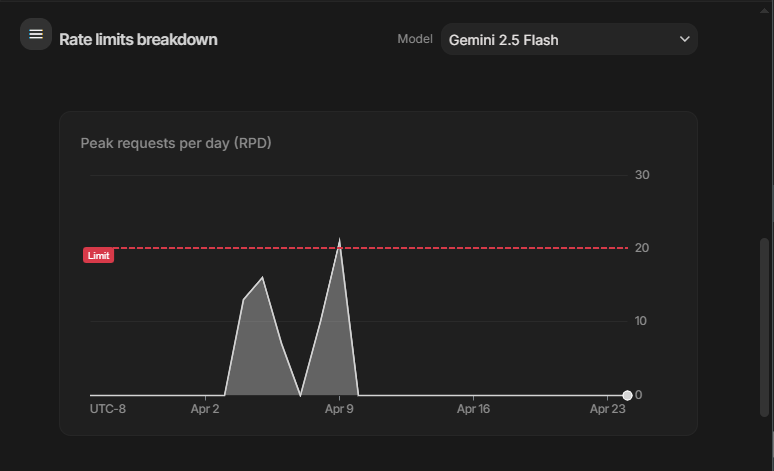
Fig 2. The Reality of Zero-Cost Infrastructure: Hitting the Free Tier limits on Google AI Studio.
The Local LLM Experiment
I tried local vision models, including MiniCPM-V through Ollama. Some outputs did not meet my formatting requirements, while larger models were less practical on my laptop. These were exploratory trials, not a labeled accuracy benchmark; I cannot support the earlier claim of perfect accuracy.
The Approach
The bot tries a configured list of Gemini models sequentially, with bounded retry handling in the linked source. A model fallback is not a durable job queue, and the simplified example below does not implement exponential backoff. Model IDs and preview availability change; check the configured list against Google's model lifecycle documentation rather than treating this article as a current model recommendation.
// Illustrative sequential fallback only; model IDs come from runtime configuration
// Retry policy and payload helpers are omitted, not implemented by this excerpt.
async function callGemini(modelNames, prompt, imageBuffer) {
  for (const modelName of modelNames) {
    try {
      const model = genAI.getGenerativeModel({ model: modelName });
      const result = await model.generateContent({
        contents: buildPayload(prompt, imageBuffer),
        // Requests JSON syntax; does not validate schema or transaction accuracy
        generationConfig: { responseMimeType: 'application/json' },
      });
      return JSON.parse(result.response.text());
    } catch (error) {
      console.warn(`[AI Engine] ${modelName} failed. Falling back...`);
      if (modelName === modelNames[modelNames.length - 1]) throw error;
    }
  }
}
Controlling webhook and database access
The webhook accepts input from the internet, so it must authenticate delivery and check who is allowed to submit records.
The code uses a Telegram webhook secret-header check and a profile lookup for allowed Telegram IDs. These are concrete access controls, not proof of a complete zero-trust architecture. A user whitelist alone cannot authenticate a webhook whose body could be forged.
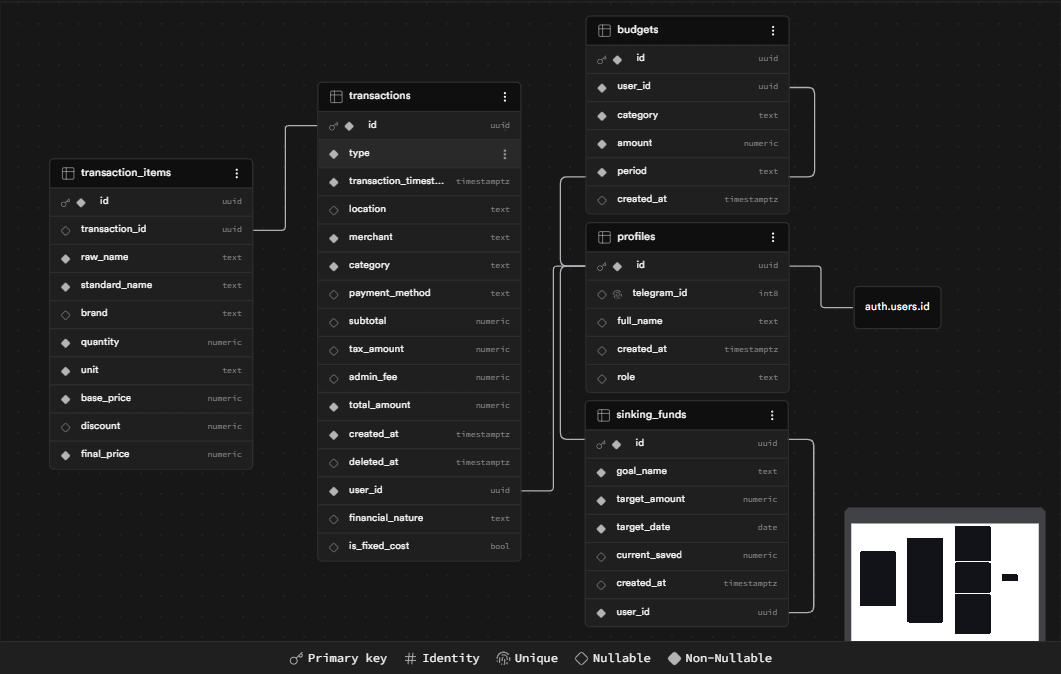
Fig 3. The data model linking user profiles, transactions, items, and budgets.
Layer 1: The Middleware Whitelist
The bot looks up the sender in profiles before extraction. The simplified middleware below uses ctx.state.userUuid, matching the context field used by the linked implementation, rather than the session field shown in the previous article.
// Telegram Middleware / ID Validation
bot.use(async (ctx, next) => {
  if (!ctx.from) return;
  const telegramId = ctx.from.id;
  const { data: user, error } = await supabase
    .from('profiles')
    .select('id')
    .eq('telegram_id', telegramId)
    .single();

  if (error || !user) {
    return ctx.reply('🚫 Unauthorized access. Your ID is not whitelisted.');
  }

  ctx.state.userUuid = user.id; // Context for downstream inserts, not a session
  return next();
});
Layer 2: Supabase Row Level Security (RLS)
Dashboard requests using an authenticated user's token rely on RLS ownership policies. The transaction policy below illustrates one table, not coverage of every table or RPC. The bot's service-role credential can bypass RLS, so compromising that credential is not contained by browser ownership policies. Backend authorization, secret management, and RPC permissions must be reviewed separately. See Supabase's RLS documentation.
-- PostgreSQL / Row Level Security
ALTER TABLE "public"."transactions" ENABLE ROW LEVEL SECURITY;

CREATE POLICY "Users manage their own data"
ON "public"."transactions"
FOR ALL TO "authenticated"
USING (("auth"."uid"() = "user_id"));
Making item-level records usable on mobile
The dashboard needed to make item-level records readable, especially on a phone.
I built a responsive Single Page Application (SPA) using Vite, React, and Shadcn UI.
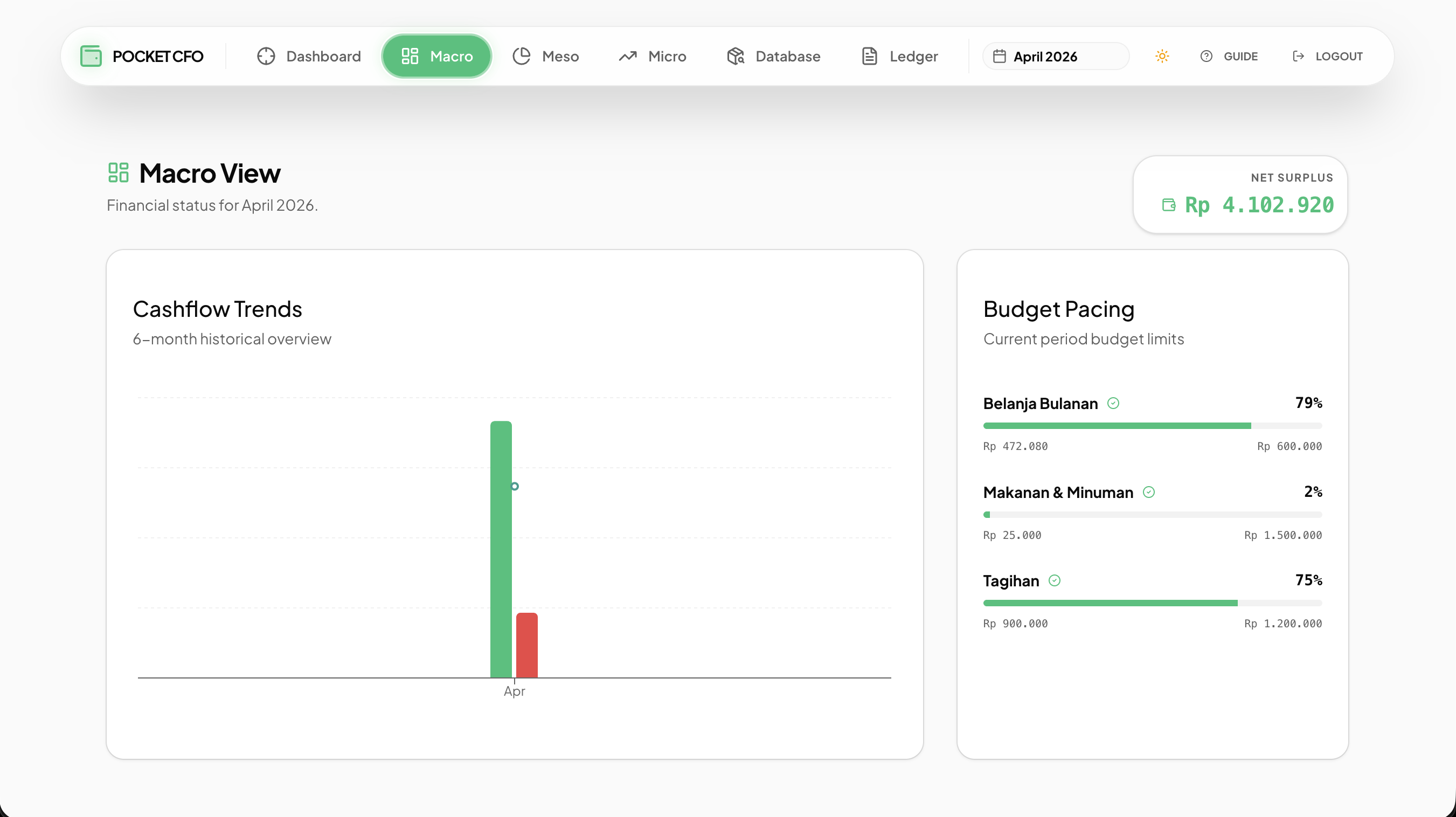
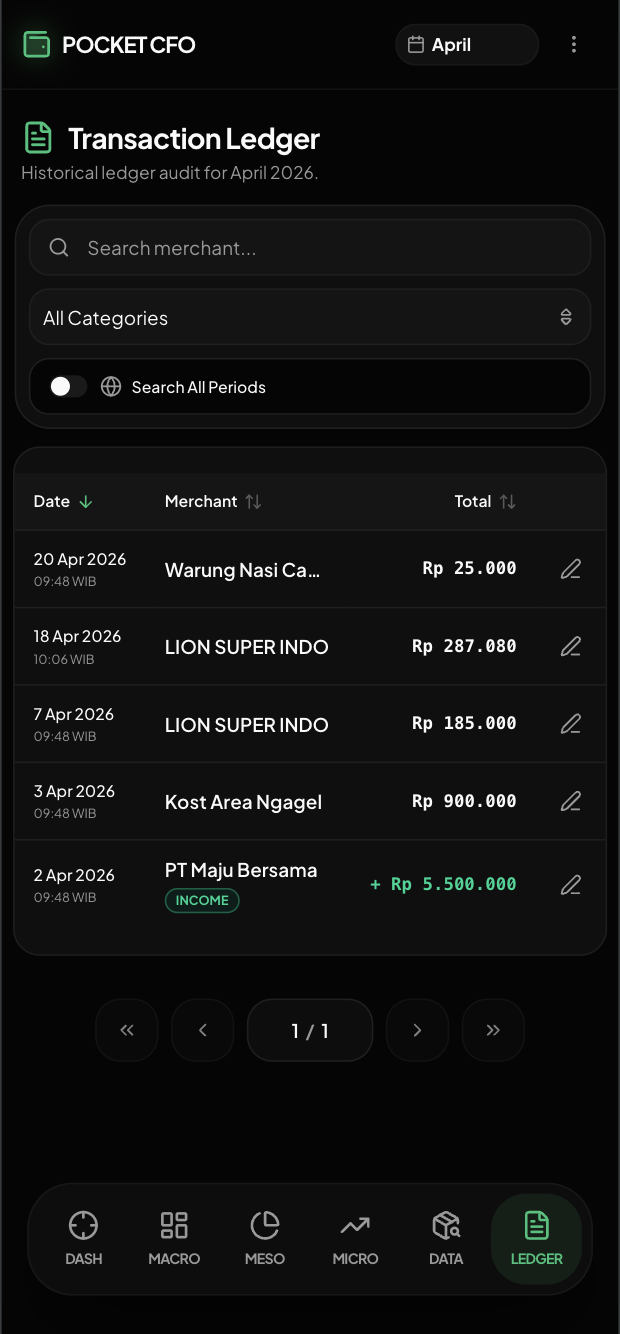
Fig 4. The Presentation Layer: Shadcn UI Recharts (top) and Dark Mode responsive tables (bottom).
The UX Trade-off
A table containing item name, category, price, date, merchant, and tags is harder to scan on a small screen. Hiding secondary columns reduces density but also hides information; it is not automatically the best choice for every user.
I used responsive layouts to balance information density with access to editing and review:
Engineering Implementation | UX Purpose |
|---|---|
className="hidden md:table-cell" | Hides secondary columns on small screens to reduce table width; overflow still depends on the remaining content. |
Header Navigation (Kebab Menu) | Condenses secondary global utilities (Theme toggle, Guide, Logout) into a single dropdown on mobile screens, keeping the header clean and maximizing vertical real estate for the dashboard. |
Direct Supabase Client CRUD | Uses Supabase's client API directly for dashboard reads and edits. Network and database latency still apply, and RLS must cover the exposed operations. |
Known Limits and Next Checks
The current workflow reduces repetitive entry for my own records. The next engineering work is to make extraction and recovery easier to verify.
Before presenting it as reliable for other users, I would need to validate extracted fields and totals, check every database/RPC error before sending a success message, test durable deduplication and failure recovery, and document backup/restore and quota handling. An OCR evaluation also needs labeled receipts and field-level results. Those are next steps, not completed results.
Explore the Pocket CFO data pipeline on GitHub
Related engineering work
Career Pipeline applies structured extraction to a different personal workflow: turning job postings into reviewed requirements and focused practice. It has its own ingestion ledger and retry design; those mechanisms have not been added to Pocket CFO by publishing this article.
For experiments with message processing across a broker and worker, see Project Argos.