View the extension source on GitHub
Working in an open-plan office, I wanted WhatsApp Web's conversation list to be less readable to someone casually glancing at my monitor. I still needed to find and open individual chats without revealing the whole sidebar.
I built WhatsApp Web Blur, a Firefox extension that injects a local stylesheet into WhatsApp Web. CSS applies a blur to matching conversation rows and removes it when a row is hovered or contains keyboard focus. The implementation uses no JavaScript content script or background worker.
This is a visual aid for reducing casual shoulder surfing. It does not encrypt messages, isolate data, or control who can access the account. The open conversation pane is outside the selectors shown here.
The implementation references are the stylesheet and manifest at commit ae8b727. These provide a stable source snapshot; the recording below illustrates one interaction.
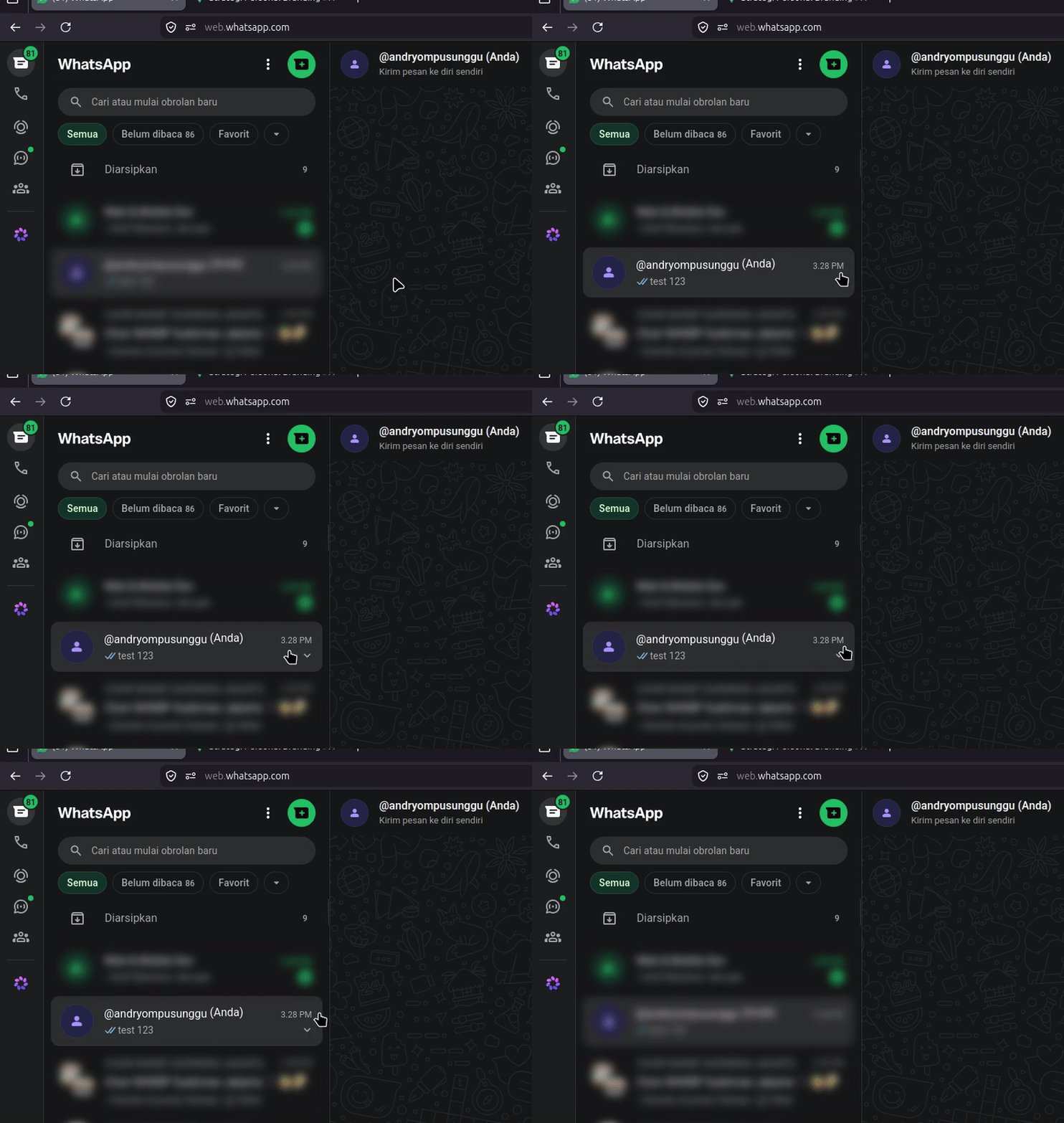
Fig 0. A hover interaction reveals the matching row while neighboring rows remain visually blurred.
The useful engineering decision was choosing a small mechanism that fits the interaction: CSS handles the visual state, and the manifest limits where it is injected.
The Problem: Choosing What to Reveal
I wanted a tool whose behavior I could inspect and whose interaction did not need event listeners, persistent settings, or a background process. That preference does not establish that other marketplace extensions are unsafe.
The two design goals were:
- Inspectability: Keep the behavior in a local stylesheet and a small manifest, with no external CSS resources or scripting in this snapshot.
- Row-level reveal: Apply the filter to conversation rows so revealing one does not require removing a filter from the entire panel.
CSS was sufficient for those visual interaction goals. It does not provide data isolation.
1. Implementation Scope
There are two runtime pieces:
- Stylesheet: Applies
filter,transition,:hover, and:focus-withinto matching rows inside#pane-side. - Manifest V3: Registers that local CSS for
https://web.whatsapp.com/*, with injection requested atdocument_start.
The reviewed manifest does not declare JavaScript content scripts, background execution, storage permissions, or separate permissions and host_permissions arrays. It still declares a site match for content injection; describing it as having no browser access would be misleading. See MDN's content_scripts reference.
2. Technical Implementation: Pure CSS State Control
The following rules are the functional CSS from the linked snapshot, with comments shortened for this article.
They use role and test-ID selectors rather than generated class names. These are still WhatsApp implementation details, not a compatibility contract.
/* style.css — Granular DOM Targeting */

/* Match non-hidden role rows, plus an alternative test-ID selector */
#pane-side [role='row']:not([aria-hidden='true']),
#pane-side [data-testid^='conversation-row'] {
  filter: blur(6px);
  transition: filter 0.12s ease-out;
}

/* Reveal rows that are hovered or contain keyboard focus */
#pane-side [role='row']:not([aria-hidden='true']):hover,
#pane-side [role='row']:not([aria-hidden='true']):focus-within,
#pane-side [data-testid^='conversation-row']:hover,
#pane-side [data-testid^='conversation-row']:focus-within {
  filter: none;
}
Why Individual Filtering Matters
If the filter is applied to #pane-side, setting filter: none on a child does not undo the parent's blur. Applying filters to rows allows each matching row to change its own visual state.
The hover and focus rules operate independently: a pointer over row A and keyboard focus inside row B can reveal both. :focus-within only works when the page actually places focus in the matching row. This is a deliberate convenience for navigation, not a guarantee that exactly one conversation is visible.
There is also a selector detail worth retaining: the aria-hidden exclusion belongs to the role-based branch. The test-ID branch does not have that exclusion. If WhatsApp changes or nests matching elements, the resulting blur needs to be inspected again.
3. Manifest Configuration and Privacy Boundaries
This excerpt retains the desktop settings and CSS registration from the reviewed manifest. The package also declares Android compatibility and icon paths; those are omitted here. This is a configuration excerpt, not a complete installable package.
The URL match must be a plain match-pattern string, without Markdown link syntax. The actual manifest uses the value shown below.
{
  "manifest_version": 3,
  "name": "WhatsApp Web Blur",
  "version": "1.1.0",
  "description": "Blurs WhatsApp Web conversation cards using pure CSS.",
  "browser_specific_settings": {
    "gecko": {
      "id": "wa-web-blur@local",
      "strict_min_version": "140.0",
      "data_collection_permissions": {
        "required": ["none"]
      }
    }
  },
  "content_scripts": [
    {
      "matches": ["https://web.whatsapp.com/*"],
      "css": ["style.css"],
      "run_at": "document_start"
    }
  ]
}
data_collection_permissions.required: ["none"] declares that the extension does not require data collection and transmission. It is a declaration about the extension, not a technical sandbox or proof that no data can leave the browser. The reviewed stylesheet contains no external resource URLs or imports, and the manifest registers no scripts. Those are concrete observations about this snapshot. WhatsApp itself continues to communicate over the network. See MDN's data-collection settings.
Firefox signing enables distribution to standard release installations after Mozilla's validation process; it does not certify absolute privacy or prove the absence of every security defect. This article does not verify a signed release artifact. See Mozilla's signing and review process.
4. Performance and Maintenance Trade-offs
Using CSS avoids adding JavaScript mouse listeners or a background worker for this interaction. Browser style evaluation, painting, and compositing still have a cost; filter: blur() and filter transitions are not zero-overhead operations. No CPU, memory, frame-rate, or comparison benchmark is published here.
The practical limits are:
- Visual coverage: Only matching conversation rows in the sidebar are blurred. Other messages, notifications, and page elements are unaffected.
- Data remains accessible: Text stays in the DOM and can remain available to assistive technology and scripts. Blur is not an access-control boundary.
- Reveal is intentional: Hover or focus reveals a row, including to someone watching the screen. Recognizability also depends on blur strength, content, and viewing distance.
- Upstream changes: Missing or changed selectors can leave rows unblurred.
document_startrequests early injection but does not guarantee every future WhatsApp layout is covered. - Accessibility and motion: The snapshot includes a short transition and has no reduced-motion rule. Focus behavior and readability need checking on the actual page. Any stylesheet change to improve this belongs in the extension repository.
For the visual interaction, a useful check is to test hover, pointer-away, keyboard focus, and simultaneous hover/focus. Repeat after WhatsApp layout updates and inspect which rows the selectors match. That is more informative than claiming permanent protection based on a single GIF.
Final Thoughts
This project solves a small, specific problem for me: making a conversation list less readable at a glance while preserving convenient navigation. Its engineering value is the small implementation and explicit scope. Stronger privacy or performance claims would need different controls and supporting evidence.